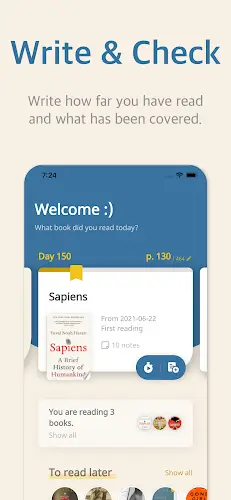

Bookmory is a perfect solution that helps you track your reading progress, manage your personal library, and build long term reading habits scientifically. The app automatically remembers the page you are currently reading, eliminating the need for tedious manual tracking and making it ideal for book lovers who want to enhance their focus. With support for all formats including physical books, ebooks, and audiobooks, Bookmory is truly an ideal companion for anyone looking to retain knowledge effectively and achieve long term personal development.
Contents
Smart Book Management and Detailed Statistics System
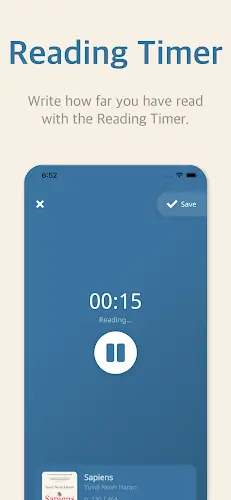
The most impressive highlight when experiencing Bookmory is the extremely easy book management through quick addition, searching, or scanning barcodes to identify book information instantly. You can organize your book collection by topic, reading status, and interest level scientifically while feeling completely secure thanks to the Google Cloud backup feature that prevents data loss. Notably, the smart timer helps you accurately track reading time and the number of pages completed, allowing the app to provide detailed statistics on your average reading speed for each book. A very clever mechanism in Bookmory is that it only counts a book in statistics once you have reached the final page, which creates realistic figures and encourages reader persistence.
Building Reading Habits and Setting Personal Goals
Bookmory is not just a place for data storage but also a powerful motivational tool to help you maintain self discipline. The app allows you to create reading schedules by day, month, or year and set specific goals for each book or your entire library. To form a sustainable habit, you can start with a small goal of just 15 minutes a day as suggested by the app, ensuring that reading never feels like a burden. Intuitive statistics, goal systems, and achievements act as inspiring milestones, helping you better understand your personal habits and continuously improve the speed of knowledge acquisition every day.
Reading Diary and Inspiring Quote Archive
Instead of letting valuable knowledge slip away after closing a book, you can use Bookmory as a personal diary to record important content and valuable lessons. Features for storing great quotes, memorable philosophies, and highlighting support help you remember more deeply through detailed comments and book reviews. You can customize these notes with personal backgrounds and styles, turning each reading diary page into an artistic and inspiring space. Connecting with the community to share reading inspiration and receive great book suggestions further adds to the exciting experience on your journey of discovering new pages.
Optimizing the Experience with the Fully Unlocked Version
With the Premium unlocked version, you can access all advanced features without limits, maximizing your management and knowledge retention without any barriers. The intuitive, beautiful, and easy to use interface of Bookmory not only helps you manage time more effectively but also creates joy every time you open the app. Overall, this is a comprehensive solution that helps you not only read more but read deeper, making knowledge accumulation an integral part of a modern lifestyle.
Conclusion
Bookmory is not just a management app but has become a true companion on the path of self development. It helps you transform brief reading moments into a systematic and inspiring process of knowledge accumulation. Seeing daily growth statistics or reviewing favorite quotes presented beautifully is an invaluable spiritual boost, urging you never to give up. In a world full of distractions, owning a professional tool like Bookmory is the key to maintaining focus, understanding the value of each book, and building a solid knowledge foundation for the future.